
Go to Windows platform Display platforms icon
Go to Windows platform Go to Mac platform Go to Android platform Go to iOS platform
Zoom Player MAX icon

Zoom Player MAX

22.5
Dev Onboard
4.2 5 reviews
259.4 k downloads
security security

Highly Customizable, Feature rich Media Player and HTPC Media Center

Advertisement
Remove ads and more with Turbo
Advertisement
Remove ads and more with Turbo
Uptodown Content Team icon
Reviewed by
Uptodown Content Team
Review written by Uptodown's in-house Editorial Team using the insights provided by Inmatrix.

Zoom Player represents my life-long quest as an indie developer to craft the most versatile media player and Home Theater experience for Windows.

What makes Zoom Player the best overall media player? It's the user interface, viewing experience and tweaking options. Lots and lots of tweaking options, tailoring the playback experience to your personal preferences without bloating up or slowing down.

Advertisement
Remove ads and more with Turbo

Under the hood, Zoom Player uses the best audio/video decoding and rendering technologies available to get the job done. Whether it's Microsoft DirectShow framework, the FFMPEG project, LAV Filters, libVLC or the Chromium browser, Zoom Player uses the best playback engine for the task. The flexibility of picking the right media engine for the task means that pretty much every media format can play at the highest quality your hardware can muster. And if it doesn't, I will do my best to resolve any issues in the discussions area.

What about Control? If you're scared by long lists, skip to the next paragraph, otherwise know that Zoom Player can be controlled with a Remote Control app; a physical Remote Control; an XBOX controller; a mouse; the keyboard; using a PowerShell Script; Home Automation apps; over TCP/IP; WinAPI; through the Command line; and even with a web browser. Sorry for the long list, but the level of control and attention to detail I designed into Zoom Player is unmatched! Every key, click, swipe, roll and button can be customized to your preferences.

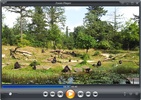
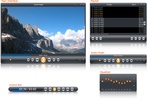
How does Zoom Player look? Amazing. The screenshots only tell half the story. With Zoom Player's powerful control overlay customization features, you can easily pick and choose which user interface elements appear on screen (buttons, volume bar, timeline bar, title text, etc), their size, color, transparency and much more.

Zoom Player's user interface is designed to look good on any display, regardless of the screen size or resolution and is ideal for the visually impaired. You no longer need to be an artist or coder to craft a beautiful user interface tailored to your exact requirements, you can do it yourself with a few simple clicks.

[b]

What about Streaming?[/b] Zoom Player has the best IPTV implementation on Windows, providing access to live TV from across the world (caveat below). YouTube channels, trends, searches and playlists can be added into the Media Library with ease. Stream content from multiple media servers such as PLEX, Emby and Jellyfin. Other streaming sites either work automatically or can be supported through 3rd party plug-ins.

Home Theater? Zoom Player includes an extensive list of Home Theater features backed up by a powerful media library that can help organize your collection and content sources (see screenshots), including a TV and Movie JukeBox modes that displays Backdrop and Poster images along with meta-data such as description, actors, genre, content-rating, etc.

Support? The quick usage guides are the first line of support, clear and concise. Next I wrote the most in-depth documentation for a media player, ever. Every checkbox or setting is explained in great detail. I personally provide support and take requests on Zoom Player's reddit community and review the Steam discussion area often. Every question is answered respectfully and thoughtfully. Did you come up with a cool new feature you would like me to add? Let me know and I'll see if I can get it done.

Caveats:

- HDR playback requires that the Video Renderer is set to either MadVR or MPC-VR. You may need to configure the selected video renderer with your choice of HDR settings.

- BluRay playback only works on decrypted content, encrypted discs will not play.

- To play BluRay discs with menus, you need to install libVLC and the JAVA runtime engine (Zoom Player v19 required).

- DVD playback works but it's dependent on Microsoft's Framework which can have issues on some systems. Most issues are easily resolved by switching the audio/video decoders used for DVD, but if you are having issues, create a post on the discussions area and I will help you resolve it.

- Zoom Player implements the IPTV playback standard but I did not include any commercial content. To access commercial IPTV, you must purchase a subscription from an IPTV service provider of your choice. I don't have a recommendation.

Information about Zoom Player MAX 22.5

Basic information

Developer Inmatrix
Category Media Players
Rating All ages
Languages English

Distribution model

Pricing Free
License Proprietary
Copyright © 2026 Inmatrix
Why is this app published on Uptodown? (More information)

Security and privacy

Required permissions Not applicable
See security and antivirus report

Download info

Downloads 259,426
Date Jul 10, 2026
File type EXE
Size 95.56 MB
SHA256 4486a611ccad7262c10815195486d14de0e6afa0901c00bddafcaec6ba3a21ec
Advertisement
Remove ads and more with Turbo

Older versions

See more
exe 22.2 Feb 26, 2026
exe 22.0.1 Jan 13, 2026
exe 22.0.0 Dec 19, 2025
exe 21.5.1 Aug 5, 2025
exe 21.5 Jul 18, 2025
exe 21.3 May 30, 2025

Rate this App

Review the app
Zoom Player MAX icon

Rating

4.2
5
4
3
2
1
5 reviews

Comments

helinux icon
helinux
in 2022

I will test it! Thank you!

7
Reply
younggreycamel8707 icon
younggreycamel8707
in 2021

May 2021 - Zoom Player is a good DirectShow player, but it is starting to show serious limitations: only a 32-bit version exists (the LAV filters, which Zoom Player uses, are rightly optimized for 64-...See more

3
Reply
900809 icon
900809
in 2009

Excellent playback program, it's wonderful! Believe me, you won't have to include codecs and new specialized players. You'll see it's everything you need...

16
Reply
Advertisement
Remove ads and more with Turbo
SSuite Free TV-App icon
Streamlined TV-app magic, transforms any PC into a sleek viewing hub!
IPTV Stream Player icon
Complete IPTV content player for Windows
IPTVnator icon
Play IPTV links on your PC
IPEXO IPTV Player icon
IPEXO M3U or IPTV Player is a media player to stream your playlist
Zoom Player Stream icon
Highly customizable, feature rich Media Player and IPTV streamer.
IPTV Player Nova Pro icon
IPTV Player Nova is a fast, modern IPTV player for Windows.
HEVC Video Extensions from Device Manufacturer icon
Play HEVC (H.265) encoded videos on Windows
VLC Media Player icon
A powerful media player and streaming server
SSuite Free TV-App icon
Streamlined TV-app magic, transforms any PC into a sleek viewing hub!
IPTV Stream Player icon
Complete IPTV content player for Windows
ProgDVB icon
The easiest way to watch TV online on your PC
Pluto TV icon
Access content from hundreds of channels online
Movies & TV icon
Buy or rent movies and series without ads
IPTV Player Nova Pro icon
IPTV Player Nova is a fast, modern IPTV player for Windows.
Zoom Player Stream icon
Highly customizable, feature rich Media Player and IPTV streamer.
IPEXO IPTV Player icon
IPEXO M3U or IPTV Player is a media player to stream your playlist
CapCut icon
Incredibly powerful and easy-to-use video editor
HEVC Video Extensions from Device Manufacturer icon
Play HEVC (H.265) encoded videos on Windows
FormatFactory icon
Conversion between video, sound and image formats
Adobe After Effects icon
The most advanced video-editing tool from Adobe
VLC Media Player icon
A powerful media player and streaming server
Adobe Premiere Pro icon
Video editing for professionals and beginners
SSuite Free TV-App icon
Streamlined TV-app magic, transforms any PC into a sleek viewing hub!
PotPlayer icon
A powerful and versatile video player for PC